
Built for immigration firms that certify in-house
Turn a 30-minute translation workflow into a 3-minute review.
Upload your client's foreign-language document. FirmCert drafts the complete English translation, flags anything it can't reliably read, and prepares the certification on your firm's letterhead. Your designated reviewer edits, approves, and signs.
The judgment stays with you.
No credit card required.
See the workflow before you try it.
This is the software your team would use — not a mockup.
1 · Upload
Upload documents
Trial: 5 documents remaining.
Files (PDF or photo/scan)
Document language
Who signs the certification?
Or "No firm signer" for a Ready-to-Sign deliverable your client's certifier signs.
2 · Review & sign
Original
ACTA DE NACIMIENTO
Registro Civil de Costaverde
English translation
BIRTH CERTIFICATE
Full name: Lucía Ramírez Ejemplo
Date of birth: March 12, 1994
Registrar: [ILLEGIBLE] ← flagged, not guessed
[Round seal: Civil Registry…]
☑ I, Daniela Osei, have reviewed this translation against the original and certify it is complete and accurate.
3 · Deliver
Recent documents
Ramírez — birth certificate
Spanish → English · signed on your letterhead
Ramírez — marriage record
Spanish → English · signed on your letterhead
Okafor — police clearance
Spanish → English · signed on your letterhead
Audit log: uploaded by A. Reyes · signed by Daniela Osei · 2 pages
From client document to signed translation in three steps.
1
Upload the source document
Upload the client's source document and choose the reviewer who will ultimately approve and sign it.
2
FirmCert builds the translation
FirmCert reconstructs the document in English, including fields, stamps, seals, dates, and marginal notes. Anything uncertain is flagged instead of invented.
3
Review, sign, deliver
Your reviewer compares source and translation side by side, makes any needed edits, and signs the certification.
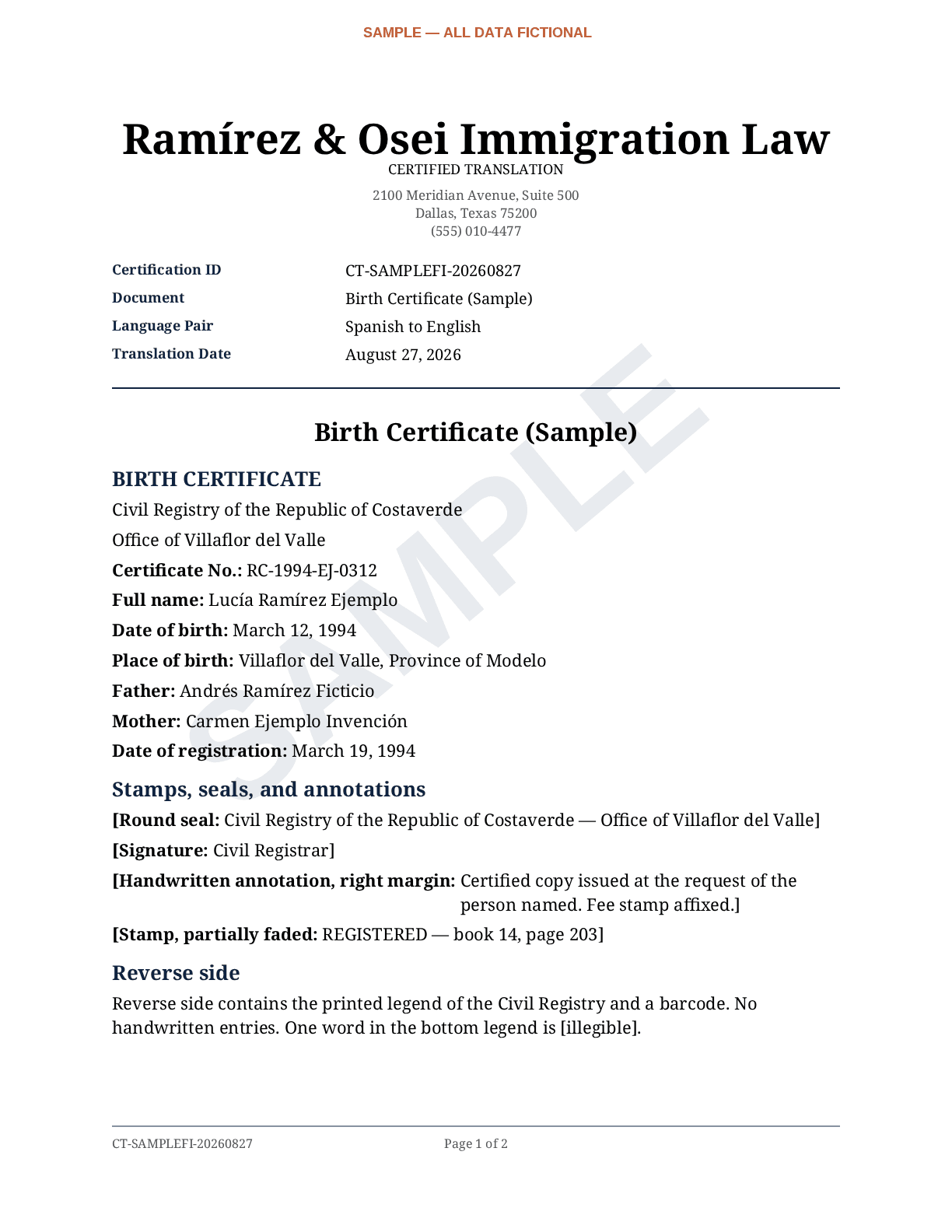
See exactly what your client receives.
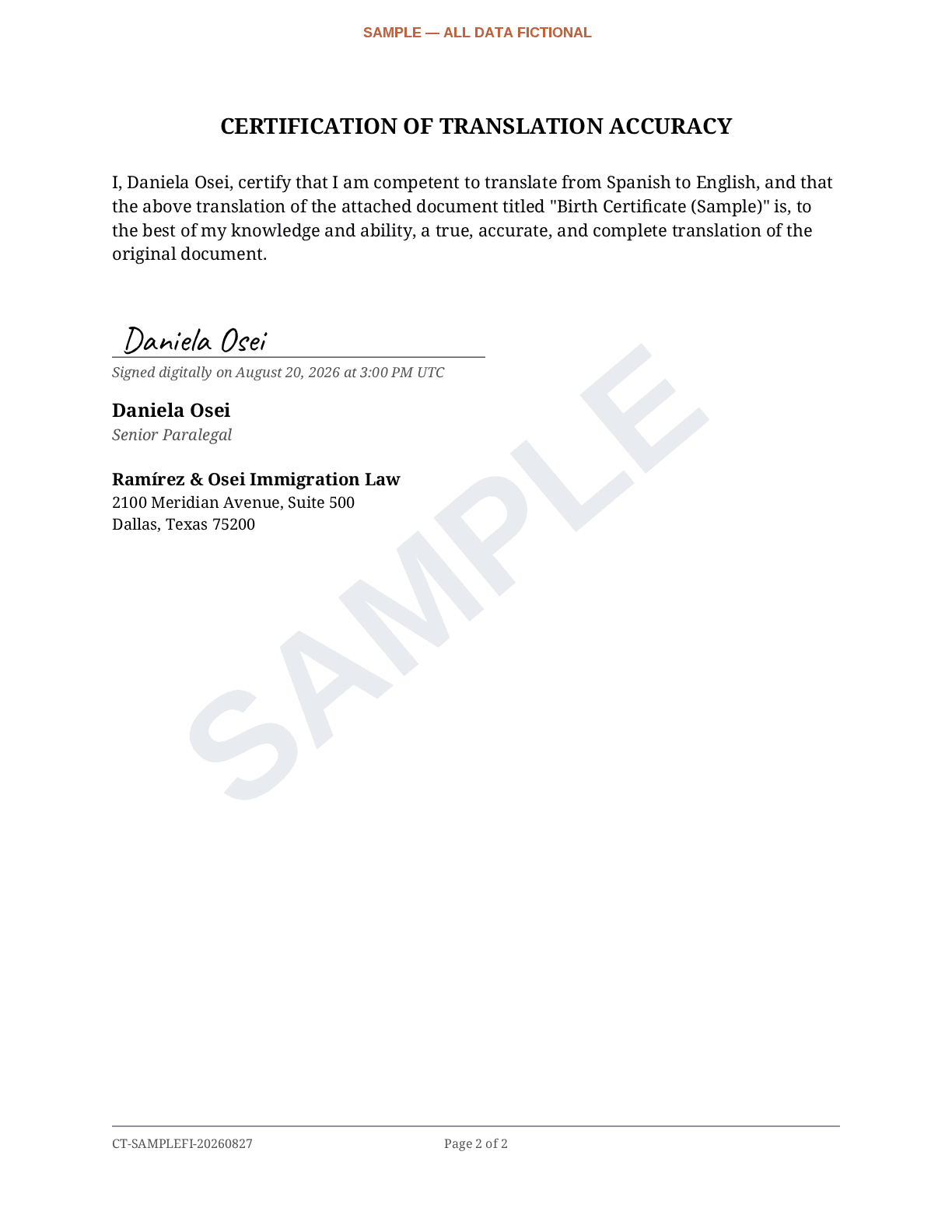
Rendered by the production engine from a fictional Spanish birth certificate — watermarked SAMPLE, on a fictional firm's letterhead.
The original
ACTA DE NACIMIENTO
Registro Civil de la República de Costaverde
Oficina de Villaflor del Valle
Nombre completo: Lucía Ramírez Ejemplo
Fecha de nacimiento: 12 de marzo de 1994
Lugar de nacimiento: Villaflor del Valle, Provincia de Modelo
…stamps, seals, and a handwritten margin note follow. All data fictional.
The English translation, on firm letterhead
The signed certification page
The economics are simple: save staff time on every document.
Without FirmCert
15 documents a month
× 30–45 minutes each
= 8–11+ staff hours
Transcribing, translating, formatting, and getting the certification wording right — by hand, for every document.
With FirmCert
FirmCert drafts
→ your staff reviews
= minutes per document
Plans start at $95/month. The math against even one staff hour is not close.
Based on production experience from our certified-translation operation, not survey estimates.
Built around the responsibilities your firm can't delegate.
The signer is always a real person
You designate the reviewer at upload, and only that member's own login can sign — not another member, not a firm admin, not FirmCert staff. Every certification is attributable to a named person at your firm.
Your firm stays on the document
Deliverables are fully white-label: your letterhead, your logo, your contact block, your certification ID. Nothing your client receives carries a FirmCert mark.
Uncertain text is flagged, never invented
Rotated stamps, low-resolution scans, handwriting in the margins — what the engine can't reliably read it marks as illegible and surfaces in review, instead of silently guessing.
Every action is attributable
The audit log records who uploaded each document, how many pages, who signed, and when — visible to your firm admins, not just to us. Support actions on your workspace are recorded with both identities.
Built for client-confidential documents.
Law firms hand us their clients' most sensitive records. The security page says plainly what happens to them — no inflated enterprise language, only what is actually true today.
Review security & data practices →- Encrypted in transit and at rest, with per-record encrypted storage keys
- Every upload passes malware scanning before it is processed
- Provider API agreements that do not permit training on submitted content
- Only the designated signer's own login can sign — enforced server-side
- Per-document audit log, visible to your firm admins
- Published subprocessor list; deletion requests honored on demand
Who FirmCert is for.
Immigration legal teams
Bring certified-translation production into one consistent in-house workflow. Any member uploads; the reviewer you designate edits, approves, and signs; the deliverable renders on your letterhead with a full audit trail. Review and signature responsibility stays with your professional — FirmCert just removes the production work around it.
Start freeProfessional translators
Independent certified translators use the same drafting, reconstruction, review, and certification workflow — with your own name and letterhead on the client-ready output. No law-firm process required.
FirmCert for translators →Real software
The interface above is the product, not a concept.
Real output
The sample deliverable is rendered by the production engine.
Real trial
5 documents, no card — judged on your own client files.
Real accountability
Named signers, enforced server-side, with an audit log.
Straightforward pricing.
Priced by pages, not seats — your whole team is included on every plan.
Starter
$95/month
30 pages included · unlimited members
Growth
$199/month
75 pages included · unlimited members
Questions firms ask first.
Who reviews and signs the translation?
A person your firm chooses. At upload you designate the reviewer; only that member's own login can sign — not another member, not a firm admin, and not FirmCert staff. If you'd rather have your client's own certifier sign, choose "no firm signer" and FirmCert delivers a Ready-to-Sign package with a blank certification instead.
Can my team edit FirmCert's draft before signing?
Yes. The reviewer opens the draft next to the original document and can edit every section — headings, body text, and notes — before signing. Nothing is signed or delivered until your reviewer approves it.
What happens when FirmCert can't confidently read part of a document?
It marks that text as illegible instead of guessing, and the marker is visible in the review screen so your reviewer can resolve it against the original. An invented name in a legal filing is a far bigger risk than an honest flag.
Does the final translation use my firm's branding?
Yes. Deliverables render on your firm's letterhead with your name, logo, address, and contact block. There are no FirmCert marks anywhere on what your client receives.
What document types does FirmCert support?
Any PDF or photo/scan up to 30 pages per document. Firms typically run the civil documents immigration filings rely on: birth and marriage certificates, police clearances, academic records, licenses, and similar records with stamps, seals, and handwritten notations.
What languages are supported?
FirmCert translates into English from 88 source languages, including Spanish, Chinese, Arabic, Vietnamese, Russian, Portuguese, French, and Haitian Creole. The full list is in the upload form.
How is client document data handled?
Documents are encrypted in transit and at rest, scanned for malware before processing, and covered by provider API agreements that do not permit training on submitted content. Deletion requests are honored on demand, and the subprocessor list is published. The security page describes all of it plainly.
Can I try FirmCert without a credit card?
Yes. The trial includes 5 documents and asks for no card. Run real client files through it and judge the output yourself.
Is FirmCert intended to replace professional review?
No — it's built around it. FirmCert produces the draft and the certification page; your designated reviewer compares it to the original, edits, and signs. The certification wording follows the format described in 8 CFR § 103.2(b)(3), and the person signing it is always your professional, never software.
Can professional translators use FirmCert without a law firm?
Yes. Independent certified translators use the same drafting, review, certification, and client-ready formatting workflow — with their own name and letterhead on the output. See FirmCert for translators.
Run a real client file through it. That beats anything we could say.
Start free — 5 documents, no card5 documents. No card. Your reviewer keeps the final word.